- 2025 年 2 月 15 日
登录问题?快速修复和支持
- 疗愈智慧
- 支持指南
1) 确认您访问的是正确的网站
需要了解的是,疗愈智慧拥有两个网站平台:
www.healingwisdom.com- 提供有关疗愈智慧信息的主要网站。
portal.healingwisdom.com- 学员平台。在这里您可以访问培训资源、日程安排和 Zoom 链接。要登录,请单击页面右上方的 "登录 "按钮,或访问portal.healingwisdom.com/login.
ㅤ。
2) 确认登录凭证
登录时,请确保使用与注册培训时相同的电子邮件地址。请确保输入的方式与注册确认电子邮件中的方式完全相同。
ㅤ
3) Enter your verification code
When prompted during login, Podia (the platform hosting our Student Portal) emails you a 6-digit verification code to protect your account. This email is legitimate, and the code is valid for 30 minutes.
Keep the login page open. Do not close, reload, or navigate away from it. Check your email in a separate tab or on another device, then enter the code on the original login page.
Allow a few minutes for the email to arrive. Enter the code carefully, without extra spaces.
-
Use the latest code. Reloading the login page or starting again in another tab or browser generates a new code and invalidates the previous one. If your code has expired, restart at portal.healingwisdom.com/login to get a new one.
ㅤ
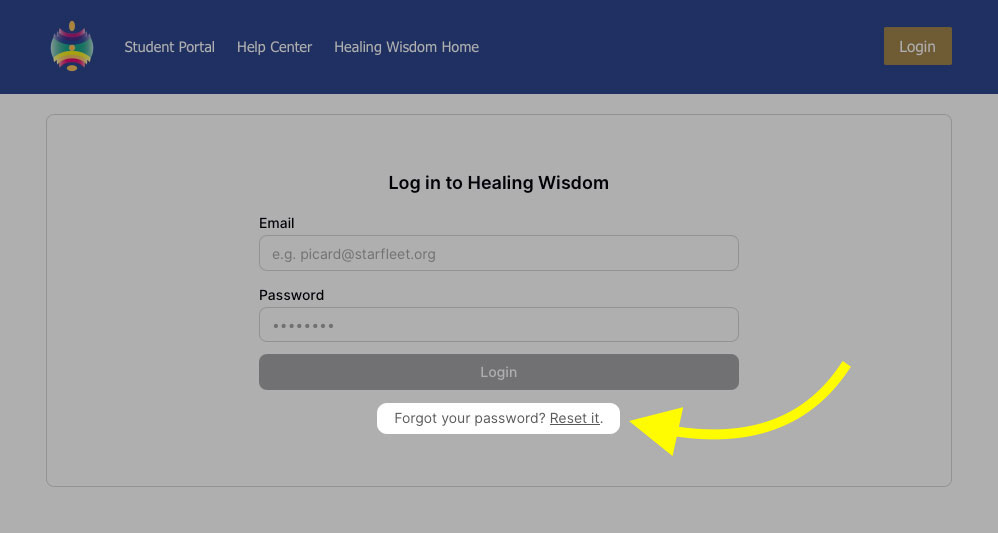
4) Reset your password
如果密码无法识别,您可以在登录页面重设密码。
ㅤ
5) Try a different browser
有时,问题是由于特定的浏览器造成的,例如
有问题的浏览器扩展
浏览器的密码自动填充功能可能会自动输入旧密码
Cookie 和缓存可能存储了过期信息
解决方案
尝试不同的浏览器
ㅤ
还有问题吗?
如果您已经尝试了以上所有方法,但登录仍然有问题,请立即与我们联系。
请发送电子邮件至portal@healingwisdom.com,并提供以下信息:
受影响账户的名称和电子邮件地址
您遇到问题的培训/活动
您尝试过的步骤
您遇到的错误信息/屏幕截图